
Photo editing, step by step
How to enhance a low-quality photo with AI
Use AI Photo Enhancer to improve photo clarity. Follow a low-light portrait from upload to the actual enhancement result, with tips for checking detail.
Upload the low-quality original
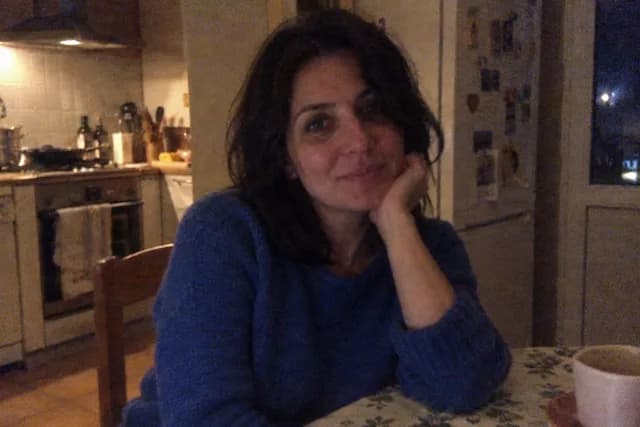
Open AI Photo Enhancer and upload your photo. This example has low-light noise, dark shadows and soft facial detail.
Keep in mind
Keep the original so you can judge changes rather than just overall sharpness.
Inside the editor · Step 1

Choose Enhance image quality
Select Enhance image quality and generate the preview. This example uses enhancement alone. The editor also offers upscaling modes when you want to request larger dimensions.
Keep in mind
Enhancement and upscaling are different goals; a requested scale does not guarantee a specific final resolution.
Compare details and download
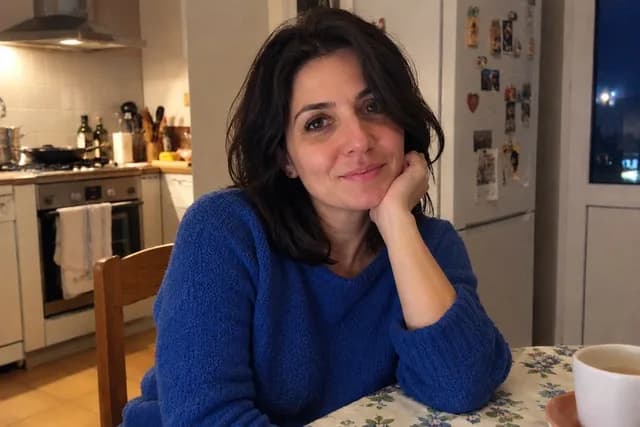
Inspect the face, hair, clothing texture and background against the source. If the result suits your purpose, download it and retain the original alongside it.
Keep in mind
Sharper-looking detail can be newly generated. Check faces and text instead of assuming every detail was recovered.
AI-created low-quality source, processed through the Photo Enhancer. The result has only been resized and converted for web display, with no extra retouching.
Common questions
A few answers before you start.
How can I improve a blurry photo online?
Upload the photo to AI Photo Enhancer and choose Enhance image quality. Compare facial features, textures and text with the original. Mild softness may improve, but severe blur or missing detail cannot be recovered exactly.
What is the difference between photo enhancement and upscaling?
Enhancement aims to improve perceived clarity and image quality. Upscaling requests larger dimensions. The editor offers separate and combined modes; the requested scale is not a guarantee of the final resolution.
Can AI brighten a dark photo or reduce noise?
Enhancement may improve the appearance of dark areas and noise, depending on the source. Check whether colors, skin texture and shadows still look appropriate, since the process can reinterpret details.
Will AI enhancement change faces or text?
It can. The model may generate plausible details that were not readable in the original. Inspect faces and lettering closely, and keep the original when accurate documentation matters.